 Lingofloat
LernenSieLingofloatkennen—alles,wasSiebrauchen,umEnglischzumeistern
Vergessen Sie das Jonglieren mit Podcasts, YouTube, Wörterbüchern und Anki-Decks. Lingofloat ermöglicht es Ihnen, Ihre englischen Lieblingsinhalte zu genießen und sich neue Sprache mit Leichtigkeit zu merken.
Transkribieren Sie Ihre Eingabequellen
Klicken Sie auf einen Podcast, fügen Sie einen Link ein. Lingofloat generiert hochwertige Transkripte und wortgenaue Zeitstempel für jede Audioquelle.
Hören, wiederholen und sofort verstehen
Hören Sie authentische Inhalte mit interaktiven Transkripten, die es Ihnen ermöglichen, zu springen, zu wiederholen und Wörter mit intuitiven, detaillierten Erklärungen nachzuschlagen.
Überprüfen Sie Sprache in verschiedenen realen Kontexten
Speichern Sie schwierige Wörter oder Sätze und meistern Sie sie durch gut gestaltete Aktivitäten mit intelligentem SRS (Spaced Repetition System).
Features
Transkribieren Sie alles mit Präzision
Lingofloat ermöglicht es Ihnen, YouTube-Videos, Podcast-Episoden und Ihre eigenen Audio- und Videodateien direkt in der App mit branchenführender Genauigkeit zu transkribieren und sie im selben Arbeitsbereich zu überprüfen.
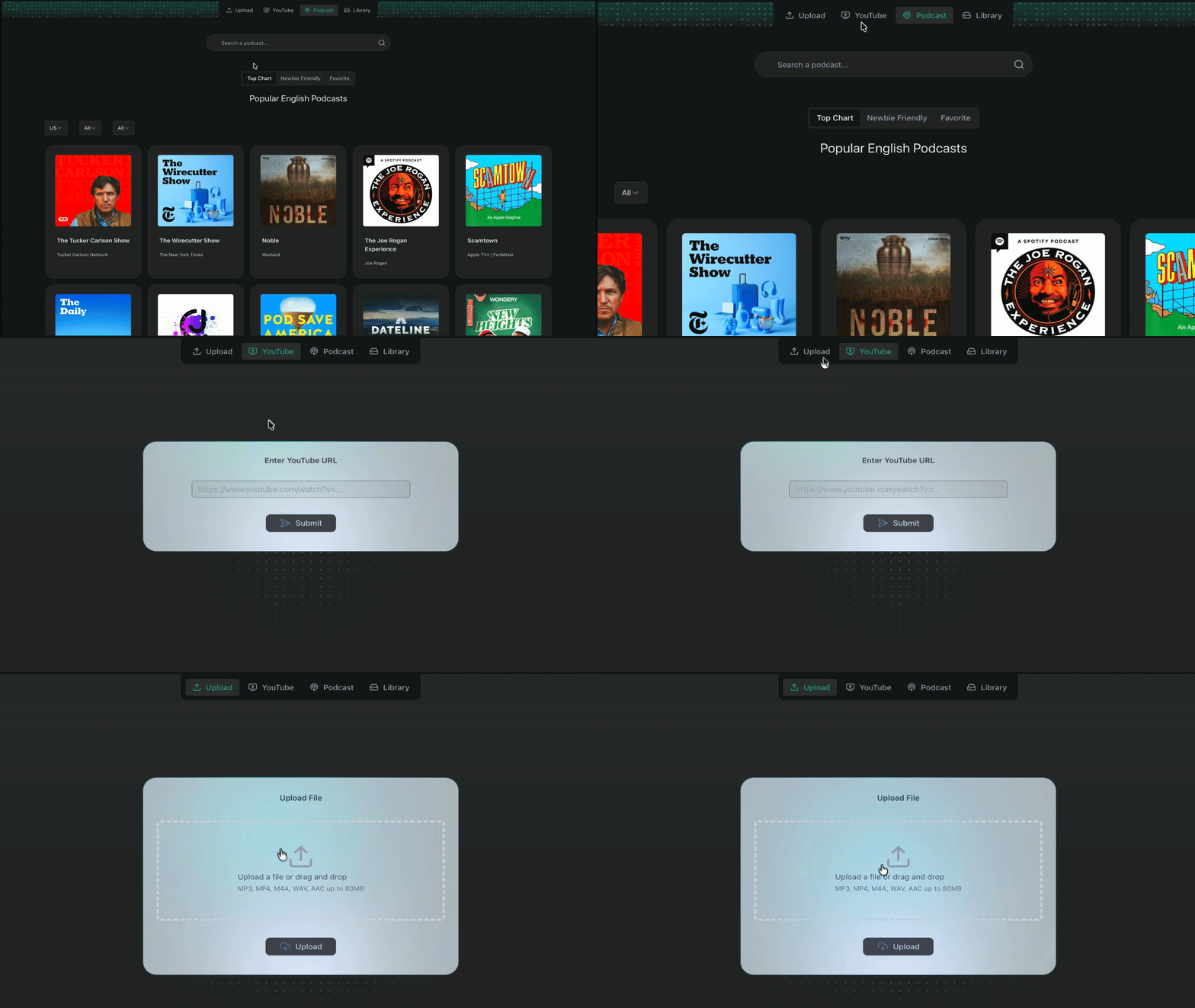
YouTube
Direkt per URL importieren
Podcasts
Wählen Sie eine Episode direkt in der App
Aufnahmen
Laden Sie Ihre Aufnahmen hoch
Dateien
mp3, wav, m4a hochladen
Ein Mediaplayer,
von dem Englischlerner träumen
Herkömmliche Mediaplayer sind für Unterhaltung gebaut. Unserer ist für Lernen, Verständnis und ununterbrochenen Fluss gebaut.
Volle Kontrolle über Ihre Inhalte
Intelligenteres Wörterbuch, nicht härteres
Verständnis auf allen Ebenen
Wortgenauer Zeitstempel
Springen Sie sofort zu jedem spezifischen Wort.
Intelligente Auswahl
Wählen Sie jeden Teil des Audios aus und spielen Sie ihn erneut ab.
Tastaturkürzel
Steuern Sie die Wiedergabe, ohne die Finger zu heben.
Auto-Pause
Pausiert automatisch bei natürlichen Pausen.
Variable Geschwindigkeit
Passen Sie die Wiedergabegeschwindigkeit an Ihr Komfortniveau an.
Wiederholen Sie Vokabeln
in verschiedenen echten Gesprächen
Keine manuelle Anki-Arbeit oder Importe mehr. Lingofloat erstellt gut gestaltete Wiederholungssitzungen, die es Ihnen ermöglichen, sich nicht nur an einen Ausdruck zu erinnern, sondern ihn tatsächlich im echten Leben zu verwenden.
Zuerst hören — kein Text
Beginnen Sie mit einem kurzen, natürlichen Gespräch, das Ihre Zielwörter enthält. Kein Transkript — nur reines Audio, um Ihr Ohr zu trainieren.
Schneller Verständnischeck
Ausspracheübung
Echo & Shadowing mit Feedback
Aktives Umformulieren
Video-Demo
Intelligentes Tracking
Unser Algorithmus lernt, was Sie wissen, und entscheidet, wann Sie es wiedersehen müssen.
Sichtbarer Fortschritt
Beobachten Sie, wie Ihre Fließfähigkeit mit detaillierten Statistiken zur Hör- und Sprechgenauigkeit wächst.
Verteilte Wiederholung
Vergessen Sie nie ein Wort. Wir planen Wiederholungen zum perfekten Zeitpunkt für die Gedächtnisspeicherung.
Beginnen Sie Ihre Reise
Kostenlos - Offene Beta jetzt!
- Unbegrenzter Import für Podcast-Shows, YouTube-Videos und Mediendateien mit hochpräziser Transkription
- Zugriff auf Hochleistungsplayer mit segmentierter Wiedergabe und wortgenauen Zeitstempeln
- Sofortiges Nachschlagen von Definitionen und Aufschlüsselungen auf Absatzebene
- Überprüfung des Kontexts echter Gespräche mit einem intelligenten System für verteilte Wiederholung
Von ernsthaften Lernern vertraut
"Ich hing fest, indem ich Podcast- oder YouTube-Segmente wiederholte und manuell Notizen machte. Jetzt kann ich überall wiederholen, wo ich will, es speichern und in derselben App überprüfen."
"Wenn Sie versuchen, vom passiven Zuhören dazu zu kommen, tatsächlich gut darin zu werden, ist Lingofloat das einzige Tool, auf das ich Leute hinweise. Sein Wiederholungssystem verankert die neuen Wörter wirklich in Ihrem Gedächtnis."
"Ich lade Teammeetings hoch, erfasse alles, was ich verpasse, und übe es am selben Abend. Es hat drei Apps ersetzt und mir Selbstvertrauen gegeben, mich in Kanada niederzulassen."
Häufig gestellte Fragen
Die meisten Englisch-Apps halten Sie auf einem niedrigen Niveau: kurze, einfache, fast kindische Sätze, die nicht so klingen, wie Menschen tatsächlich sprechen. Das ist in Ordnung für Anfänger — aber es bereitet Sie nicht auf echte Podcasts, YouTube-Videos oder Gespräche vor. Um Englisch wirklich zu meistern, müssen Sie mit authentischem Input arbeiten: echte Stimmen, echte Geschwindigkeit, echte Grammatik, echtes Chaos. Das Problem ist, wenn Sie endlich echtem Englisch gegenüberstehen, fühlt es sich plötzlich zu schnell, zu dicht und voller unbekannter Phrasen an. Genau da kommt Lingofloat ins Spiel: Gebaut für echtes Englisch, nicht Lehrbuch-Englisch – Sie bringen Ihre eigene Podcast-Episode, Ihr YouTube-Video oder Ihre Aufnahme mit. Lingofloat hilft Ihnen, die echte Geschwindigkeit, den Akzent und die Komplexität Schritt für Schritt zu bewältigen. Löst die „Ich verstehe das nicht“-Momente – Schwieriges Vokabular, seltsame Ausdrücke, verwirrende Grammatik, schnelle Brocken — Lingofloat ist darauf ausgelegt, sie aufzuschlüsseln, im Kontext zu erklären und Sie genau das wiederholen zu lassen, was Sie brauchen. Sorgt dafür, dass die harten Teile hängen bleiben – Jedes Wort, jede Phrase oder jedes Muster, mit dem Sie kämpfen, kann gespeichert werden. Unser integriertes Wiederholungssystem verwandelt diese „schwierigen Teile“ in intelligente Übungssitzungen, sodass Sie nicht nur einmal verstehen — sondern sich tatsächlich erinnern und sie später verwenden können. Lingofloat hält Sie nicht in „App-Englisch“. Es verbindet Ihr Studium direkt mit dem echten Englisch, das Sie tatsächlich verstehen wollen.
Sowohl Shadowing als auch die Echo-Methode sind leistungsstarke Techniken zur Verbesserung Ihrer Sprachkenntnisse, aber sie funktionieren unterschiedlich. Shadowing erfordert, dass Sie einem Muttersprachler zuhören und gleichzeitig mit ihm sprechen. Die Echo-Methode beinhaltet jedoch, dem Sprecher zuzuhören und das, was er sagt, nach einer kurzen Verzögerung zu wiederholen. Während Shadowing im Bereich des Sprachenlernens bekannter ist, empfehlen wir Lingofloat-Nutzern die Echo-Methode. Der Schlüssel zu ihrem Erfolg ist die „mentale Wiederholung“ — das Innehalten, um den Klang in Ihrem Kopf zu hören, bevor Sie sprechen — was nachweislich alle Aspekte des Spracherwerbs verbessert. Für fortgeschrittene Lerner kombinieren Sie beides für die besten Ergebnisse: • Schritt 1 - (Echo): Hören Sie einen Satz, pausieren Sie und wiederholen Sie ihn, um sicherzustellen, dass Sie die Wörter und die genaue Aussprache verstehen. • Schritt 2 - (Shadow): Sobald Sie sich mit dem Text wohlfühlen, spielen Sie das Audio kontinuierlich ab und sprechen Sie es nach (Shadowing), um Geschwindigkeit und Intonation zu verankern. Für weitere Informationen empfehlen wir, dieses Video anzusehen, in dem Professor Karen Chung, die diese Methode erfunden hat, erklärt, wie sie diese Technik nutzte, um ein muttersprachliches Niveau in Mandarin zu erreichen.
Englisch aus der realen Welt kann sich anfangs definitiv einschüchternd anfühlen, besonders wenn Sie an einfache Lehrbuchbeispiele oder Sätze im App-Stil gewöhnt sind. Aber mit echtem Input zu arbeiten (mit der richtigen Unterstützung) ist einer der schnellsten Wege, Ihr Ohr zu trainieren, echte Fließfähigkeit aufzubauen und sich daran zu gewöhnen, wie Menschen tatsächlich sprechen. Und wenn sich etwas zu schwer anfühlt, müssen Sie nicht in die schwierigsten Inhalte springen. Es gibt viel authentisches Material, das anfängerfreundlich ist und dennoch hochwertig und interessant. Lingofloat ist darauf ausgelegt, Ihnen zu helfen, diese Art von echtem Englisch Schritt für Schritt zu bewältigen: Sie können pausieren, zurückspringen, kleine Teile wiederholen, das Transkript sehen und Wörter oder Ausdrücke in einfachem, lernerfreundlichem Englisch nachschlagen. Darüber hinaus bieten wir eine kuratierte Liste empfohlener Inhalte zum Durchstöbern an, sodass Sie mit einfacherem, klarerem Material beginnen und schrittweise zu anspruchsvolleren Episoden übergehen können, wenn Sie selbstbewusster werden.
Wenn Sie ein Wort oder einen Ausdruck speichern, erstellt Lingofloat einen Wiederholungsplan, der seinen Zeitplan basierend auf Ihrer Leistung anpasst. Der Inhalt, den Sie überprüfen, besteht aus einer Reihe von Aktivitäten, die Ihnen helfen sollen, mehr zu tun, als sich nur an die Übersetzung zu erinnern — Sie werden mit jedem Aspekt des Vokabulars wirklich vertraut. Entscheidend ist, dass das Gespräch und der Inhalt jeder Wiederholungssitzung einzigartig sind, was sicherstellt, dass Sie die Verwendung des Wortes meistern, anstatt die Antworten auswendig zu lernen.
Ja — legen Sie einfach Sprachnotizen oder Meeting-/Vorlesungsaufzeichnungen ab. Lingofloat transkribiert sie, lässt Sie jeden Teil wiederholen und Sprache im Kontext nachschlagen.
Lingofloat konzentriert sich hauptsächlich auf Hören und Verständnis, aber das unterstützt direkt das Sprechen. Durch die Nutzung von Lingofloat werden Sie: • Hören, wie Wörter und Ausdrücke in echten Sätzen verwendet werden • Muster und Phrasen bemerken, die Muttersprachler wiederholen • Sprache im Kontext überprüfen, sodass es einfacher wird, sie wiederzuverwenden, wenn Sie sprechen Sie können auch Gedankengruppen (kleine Sprachbrocken) wiederholen, sie nachsprechen (Shadowing) und üben, sie laut auszusprechen. Diese Kombination aus Hören + Wiederholung baut mit der Zeit einen viel natürlicheren Sprechstil auf.
Sie werden vielleicht bemerken, dass es kein zweisprachiges Transkript gibt und dass unser Wörterbuch Dinge auf Englisch erklärt, nicht in Ihrer Muttersprache. Das ist Absicht. Technisch gesehen ist das Hinzufügen vollständiger Übersetzungen einfach. Aber Lingofloat ist darauf ausgelegt, Ihnen zu helfen, auf Englisch zu denken, nicht ständig zwischen zwei Sprachen zu wechseln. So viel wie möglich im Englischen zu bleiben hilft Ihnen: • Schneller Fließfähigkeit aufzubauen (weniger Übersetzen im Kopf) • Ein stärkeres Gefühl dafür zu entwickeln, wie Wörter und Ausdrücke wirklich verwendet werden • Muster, Kollokationen und Grammatik natürlicher zu bemerken Um dies angenehm zu gestalten, sind unsere Wörterbucherklärungen in einfachem, lernerfreundlichem Englisch geschrieben — kurze Sätze, einfache Formulierungen und klare Beispiele, kein akademischer Wörterbuchjargon. Dennoch wissen wir, dass ein kleines bisschen Übersetzung immer noch nützlich sein kann. Deshalb fügen wir einen sehr kurzen Übersetzungshinweis im Wörterbuch als zusätzlichen Anhaltspunkt hinzu — gerade genug, um zu helfen, ohne Ihr Studium in reine Übersetzungspraxis zu verwandeln.
Lingofloat ist eine Web-App, aber sie ist so konzipiert, dass sie sich auf jedem Gerät, einschließlich Ihres Telefons, reibungslos und natürlich anfühlt. Für ein natives App-ähnliches Erlebnis auf Ihrem Telefon können Sie es zu Ihrem Startbildschirm hinzufügen: • Öffnen Sie Lingofloat in Ihrem Browser (Safari, Chrome, etc.) • Öffnen Sie das Browsermenü • Auf dem iPhone (Safari): Tippen Sie auf Teilen → Zum Home-Bildschirm • Auf Android (Chrome): Tippen Sie auf das Menü ⋮ → Zum Startbildschirm hinzufügen Ein Lingofloat-Symbol erscheint auf Ihrem Startbildschirm und öffnet sich im Vollbildmodus, genau wie jede andere App Keine App-Store-Downloads, keine manuellen Updates — Sie erhalten immer automatisch die neueste Version.
Wir starten zuerst mit Englisch. Weitere Sprachen stehen auf der Roadmap — Pro-Mitglieder stimmen ab, welche Sprache wir als nächstes veröffentlichen.